
Syndicate


| Title | Hits |
|---|---|
| Theming the register form in Drupal 6 | 632281 |
| True or false in php | 409690 |
| Theming the contact form in Drupal 6 | 248236 |
| File download in Drupal | 212214 |
It is common to wish to remove the time of day shown in the node “submitted” line. In Drupal 5, there were no less than three ways to achieve this, and I will present these when I'm done covering date formatting for Drupal 6. Drupal 6 allows you to modify the different formats for dates in the Administration area of your site, these different formats being small, medium and large — yep, just like pizza, oh... my... god... You could do the same in Drupal 5. However, you then had to pick among a finite list of options. In Drupal 6, you can create an nth option, if you like none of the options presented to you.
It is the medium-size date format that's used to format the submitted line in nodes, as shown in lines 2449-2460 of modules/node/node.module:
/**
 * Format the "Submitted by username on date/time" for each node
 *
 * @ingroup themeable
 */
function theme_node_submitted($node) {
  return t('Submitted by !username on @datetime',
    array(
      '!username' => theme('username', $node),
      '@datetime' => format_date($node->created),
    ));
}
In Drupal 6, the signature of the Drupal function format_date() is:
format_date($timestamp, $type = 'medium', $format = '', $timezone = NULL, $langcode = NULL)
When the 2nd parameter is not set, 'medium' is used to format the date, and the function theme_node_submitted() is not setting that 2nd parameter when calling format_date().
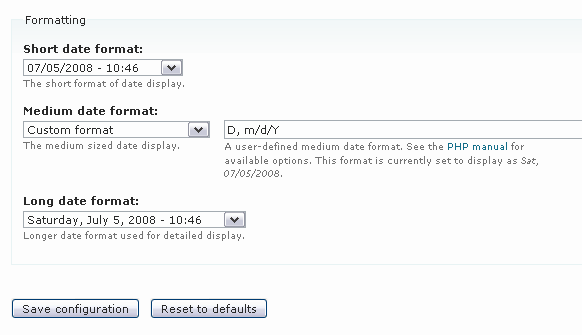
To modify the medium-size format for dates, head over to the page admin/settings/date-time of your Drupal site. Under Formatting, in the drop-down list of options for “Medium date format:”, you will find a “Custom format” option. Select it. There was no such option in Drupal 5. Note that in Drupal 6 — just like in Drupal 5 — all the preset options still show time of day for the medium-size date.

Look for the preview of the current date in the text below the field on the right, where it says: This format is currently set to display as...
(Take note also that a link to the PHP manual is provided to you, to show you how to format dates in PHP.)

If all you want to do is remove the time of day from your current default, get rid of the - H:i part. Then do a Save configuration.
Now if you look at any node on your site, you will see that the change has taken effect immediately: no more time of day.
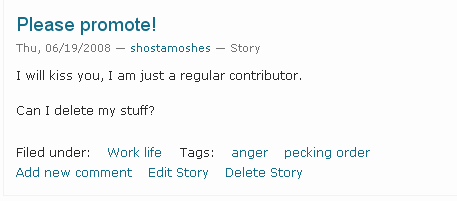
If you do not see the change, it can mean either of these two things: your theme is overriding the function theme_node_submitted(), or, the function format_date() is called within your node template file, in your theme, with some custom format, to display the date.
In Drupal 5, there were at least three ways of going about changing your date format.
Use template.php (http://drupal.org/node/209793#comment-697884) to modify the variable $submitted. Like so:
function _phptemplate_variables($hook, $vars) {
  switch($hook) {
    case 'node' :
      $vars['submitted'] = t('Submitted by !username on @date',
        array(
          '!username' => $vars['name'],
          '@date' => format_date($vars['node']->created,
                                  'custom', 'l, j M Y'),
        ));
      break;
  }
  return $vars;
}
Modify your site's settings.php file (http://drupal.org/node/134990#comment-221129) — to change your system's default medium format. Thank you, Mooffie. So you un-comment the $conf array and add one line to it, like so:
$conf = array(
#   'site_name' => 'My Drupal site',
#   'theme_default' => 'minnelli',
#   'anonymous' => 'Visitor',
    'date_format_medium' => 'D, m/d/Y',
);
Modify node.tpl.php (http://drupal.org/node/134990#comment-221973) — instead of printing $submitted, you print $node->created formatted. Like so, for example:
print format_date($node->created, 'custom', 'l, j M Y');

Comments
Awesome! I was googling on
Awesome! I was googling on how to modify the submitted by thing, thanks for pointing it out, i did not know it could be customized that easy!
Thank you.
Thanks for the excellent
Thanks for the excellent post, like other people I've found this to be a (surprisingly) straightforward solution.
News
Each piece of information displayed in the node is stored in a database table. Database tables work much like a spreadsheet, containing individual records assembled into rows and columns. You may import data into Drupal's database directly by using MySQL commands, or more simply by using an import module. Thanks for sharing information.
sex toys
Your comment is important;
Your comment is important; the matter is something that not a lot of people are talking intelligently about. I’m really happy that I stumbled across this in my search for something relating to it. Thanks for it.
info@online ticket sales.com
Eventually a well produced
Eventually a well produced and unified submit that’s really about the subject I am enthusiastic about. webcreating
Excellent read, I just passed this onto a colleague who was doing a little research with this topic. And he actually bought me lunch because I ran across it for him. I really should thanks for the free lunch I obtained.
Thanks a lot for this post
For a lot of occasions I’ve recently been searching for dependable as well as distinctive web page and this is definitely the best website exactly where I possibly could discover that. I appreciate the method you write your posts, incredibly skilled. I really could notice that you spent enough time and energy in composing your site as well as in discussing more information. I’ll take a note of your site as well as recommend it to my buddies.
Now if you look at any node
Now if you look at any node on your site, you will see that the change has taken effect immediately: no more time of day. online architecture degree
nice
styrofoam
That is, in fact, the deadliest legacy of No Child Left Behind - that we are raising generations of citizens incapable of independent thought.
sanction the future
Advantageous qualified information like this one must be kept and kept up so I will put this one on my bookmark record! Much obliged concerning this grand post and topseoconsultingfirm || freequalityseolinks
maintaining an specific end goal, which is to post a greater amount of this!
Fine, with your permission,
Fine, with your permission, I would have an RSS feed to stay informed about the future of messaging. Please million, and the important work. www.seo-rant.com Its real a solid article. This computer is so reformative. I necessity to undergo several different information nigh this author. So please release whatsoever remaining info some this cut.Thanks
online casino
http://themultiplayeronlinegames.com in addition a significant control over prospect figurings. A pure ace has technique planing manufactured in him; he gets a load of minimum a couple steps ahead, each with a couple plausible situations.
what is need of this
Beneficial qualified information like this one must be kept and kept up so I will put this one on my bookmark record! Thankful concerning this excellent post and supporting a particular finished objective, which is to post a more stupendous measure of this! www.how2backlinkseo.com
It is the medium-size date
It is the medium-size date format that's used to format the submitted line in nodes, as shown in lines 2449-2460 of modules/node/node.module: www.creditefficiency.com/
Bankruptcy Help
bad credit personal loans
I tried searching for it but
I tried searching for it but I can't seem to find it :(
chordsworld.com/lana-del-rey-young-and-beautiful-chords
agree
agree with you cara cepat hamil
posting well
The JComments is a powerful and easy to use AJAX based comment system for Joomla with flexible ACL, smiles, BBCodes and avatars support. Working on this release took extra eight months, all this effort was spent to make the component more stable and usable ..
клик сайт
joe barry panic away review
joe barry panic away review treatment I'm really loving the theme/design of your site. Do you ever run into any browser compatibility problems? joe barry panic away review treatment A small number of my blog readers have complained about my site not operating correctly in Explorer but looks great in Chrome. Do you have any recommendations to help fix this issue? reviews of yeast infection no more
You could do the same in
You could do the same in Drupal 5. However, you then had to pick among a finite list of options.
All the contents you
All the contents you mentioned in post are too good and can be very useful. I will keep it in mind, thanks for sharing the information keep updating, looking forward for more posts. essayonline.org
Drupal 5 is quite
Drupal 5 is quite appropriate application to be used in the process of editing the website. In my opinion, this application is an application that is quite easy to use and can deliver the results we expect. puppy toy
I’m satisfied I discovered
I’m satisfied I discovered this weblog ! Every now and then. Perfectly provided details in this publish. I am very experienced for this weblog. Its an useful subject. I think it may be help all of you. thanks for discussing it.
I am quite interested in the
I am quite interested in the concept of this application. In my opinion, even if it seems trivial, but apps like this are badly needed by the computer. And I think it is better if this application can be socialized better. Custom Wooden Puzzles
Pretty interesting info is
Pretty interesting info is visible in this blog and the very good articles are display in this blog. This info is very helpful for me with my project time and thanks you very much for using the valuable info in this blog
croatia cruises
Where do I get a list of
Where do I get a list of drupal functions? Besides the date function. I am very new at this.
chordsworld.com/lana-del-rey-young-and-beautiful-chords
To Change the date format on
To Change the date format on the website that I have is quite complicated. Stages that must be passed to change the format may have to be studied in more depth so that we could become easier in the changing format. Breast Augmentation Houston
Your web site include worth
Your web site include worth it to read document.I really like a person"s document, appreciation for revealing. Busana batik modern
I stumbled upon this site
I stumbled upon this site through search engine and I have been reading along all the blogs posted. They are very well written indeed. Thanks.
tapete anti-fatiga
I'm not really able to make
I'm not really able to make changes perfectly on the computer I have. In my opinion, it is quite difficult to do because I very rarely switch or the date that is, I could only use it without understanding how to make changes. automatic seo software
This subject has impressed
This subject has impressed me for quite some time. I have just started researching it on the Internet and found your post to be informative
unlock iphone 4 easily
I think it's not difficult
I think it's not difficult to edit the date display on the computer or on the website if you do not need special codes. If to change the display requires special skills like this, I think computer users had to learn them better so as not wrong in entering those codes. fat reduction houston
Very useful article for me,
Very useful article for me, there is more information I have is very important. Thank you! pelangsing herbal
To change the format as it
To change the format as it is not too difficult especially you provide some guidance on this page. In my opinion, if this guide has been tried and succeeded, I would give it a try. These codes do look complicated, but when we tried it would certainly be a different matter. Lakeway dentist
Really loved reading your
Really loved reading your blog. It was very well authored and easy to undertand. Unlike additional blogs I have read which are really not tht good. I also found your posts very interesting. In fact after reading, I had to go show it to my friend and he ejoyed it as well
siding maryland
Using Drupal 5 or Drupal 6
Using Drupal 5 or Drupal 6 is a thing that is not hard to do. In my opinion, it could be one of the things that can develop a blog that we have. Giving the clock on the blog is a trivial but important enough to do. Torpedo Gratis
Many authors have written
Many authors have written articles on this topic but this the best ever I have seen and it gives interesting information.im very much thankful to it.
Tapetes con logo
I think to learn Drupal 6 is
I think to learn Drupal 6 is not a difficult thing to do. I personally use the app drupal long time and in my opinion for the operation of this application is not difficult, and always the same even if the application has been renewed many times. Tibetan Yoga and Secret Doctrine
Replacing and date display
Replacing and date display on the blog is easy if you use drupal. I think that Drupal is an application that has a maximum performance and easy to operate even if you are a beginner like me. fatura ode
While changing the date is a
While changing the date is a trivial thing, but I think to do so is not an easy process to do. In my opinion, the existence of some kind of code like you mentioned seems not an easy thing to do without rigor. employment staffing agency in KC
The existence of the clock
The existence of the clock and date in a blog is not really a concern of the blog owner. Though this is a quite important and could be one of the widgets that are useful for a blog owner as well as for visitors to the blog. fire department schedule
The explanation you give
The explanation you give about how to edit this date as it is important to be known by every website owner. many of them, including me who do not know how to edit the date and time just like what you describe in these pages. Rolex
See explanation to convey on
See explanation to convey on this blog seem to edit and change the date on the website is not a difficult thing to do. However, when I tried to apply some of the code, I often make mistakes due to lack of care. perth passport photos
You could do the same in
You could do the same in Drupal 5. However, you then had to pick among a finite list of options. In Drupal 6, you can create an nth option, if you like none of the options presented to you. The Worldtravel Guide
good share
thanks for the share, this is really awesome read.. well done
Article is really great. I
Article is really great. I am extremely impressed with your writing skills and also with the layout on your blog.In Drupal 5, there were no less than three ways to achieve this, and I will present these when I'm done covering date formatting for Drupal 6. Drupal 6 allows you to modify the different formats for dates in the Administration area of your site, these different formats being small, medium and large — yep, just like pizza, oh... my... god... You could do the same in Drupal 5.
dvdusstore
Although the format day and
Although the format day and date seem trivial, but it can be a potentially fatal mistake. Therefore, I think it's good if we follow the procedures specified when we try to apply this application on the computer that we have. recuperar hd
Many thanks for this
Many thanks for this terrific write-up, I have sent the link to my friend, sure he will turn into a reader soon too.
topes de estacionamiento
It is common to wish to
It is common to wish to remove the time of day shown in the node “submitted” line. In Drupal 5, there were no less than three ways to achieve this, and I will present these when I'm done covering date formatting for Drupal 6. Drupal 6 allows you to modify the different formats for dates in the Administration area of your site, these different formats being small, medium and large — yep, just like pizza, oh... my... god... You could do the same in Drupal 5. However, you then had to pick among a finite list of options. In Drupal 6, you can create an nth option, if you like none of the options presented to you.
http://e-papierossy.com.pl/en/e-papierosy/112-e-papierosy-zerok-zg5421.html
http://e-papierossy.com.pl/en/e-papierosy/109-e-papierosy-zerok-z9152211.html
http://e-papierossy.com.pl/en/e-papierosy/102-e-papierosy-zerok-z231211.html
http://e-papierossy.com.pl/en/e-papierosy/101-e-papierosy-zerok-z22121.html
ppoker-free |
ppoker-free | quality-betting-news | slot machinee | sslot-machines | video-pokerr | free casino games page
This was really interesting info in this blog that to very happy for the nice technology in this blog. I am really admired for this info in this blog that to very much enjoyed for the great technology in this blog. It was searching the nice approach is visible in this blog that to way of presentation is really great. I am really thank you very much for the nice info in this blog that to utilize the nice info in this blog.
ppoker-free |
ppoker-free | quality-betting-news | slot machinee | sslot-machines | video-pokerr | free casino games page
This was really interesting info in this blog that to very happy for the nice technology in this blog. I am really admired for this info in this blog that to very much enjoyed for the great technology in this blog. It was searching the nice approach is visible in this blog that to way of presentation is really great. I am really thank you very much for the nice info in this blog that to utilize the nice info in this blog.
allergy-asthmaarticles |
allergy-asthmaarticles | alternative therapies articles | alternative-treatmentsarticles | antiagingfoods-articles | anxietyhealth-articles
Comment marketing is this idea that I want to participate in the Web's communities to earn the trust and respect of other people and the awareness. This is a blog post, right? Here's some content. You can add comments down at the bottom. This happens all over the Web. There are literally tens of millions of blogs where this could be valuable, depending on your niche, and contributing here and earning the recognition of readers can earn you all sorts of returns. Let me talk through some of these.
allergy-asthmaarticles |
allergy-asthmaarticles | alternative therapies articles | alternative-treatmentsarticles | antiagingfoods-articles | anxietyhealth-articles
Comment marketing is this idea that I want to participate in the Web's communities to earn the trust and respect of other people and the awareness. This is a blog post, right? Here's some content. You can add comments down at the bottom. This happens all over the Web. There are literally tens of millions of blogs where this could be valuable, depending on your niche, and contributing here and earning the recognition of readers can earn you all sorts of returns. Let me talk through some of these.
allergy-asthmaarticles |
allergy-asthmaarticles | alternative therapies articles | alternative-treatmentsarticles | antiagingfoods-articles | anxietyhealth-articles
Comment marketing is this idea that I want to participate in the Web's communities to earn the trust and respect of other people and the awareness. This is a blog post, right? Here's some content. You can add comments down at the bottom. This happens all over the Web. There are literally tens of millions of blogs where this could be valuable, depending on your niche, and contributing here and earning the recognition of readers can earn you all sorts of returns. Let me talk through some of these.
Hey, I would just want to
Hey, I would just want to express my gratitude for doing this tut. I have spent countless hours sifting through low-quality tutorials until I found this.
http://chordsworld.com/easy-songs-on-guitar/
obat peninggi badan alami
I really like your blog, thanks for sharing your thoughts.
hello
This is very helpful thank you...
Time ago
First of all thanks for the great tutorials Caroline it helps a lot.
may want to know how to format the date so it can show as time ago i used to do it with a module in Drupal 5 but it's not ported to D6 so if it's possible to show me thanks in advance
Many ways to do this in Drupal 6
One of them involves modifying the variable “submitted” that's passed to your node template in template.php, like so:
Not tested. Yet.
The “time ago” function in Drupal is documented here.
Will give it a try tonight
Will give it a try tonight and see if it works thanks Caroline ;)
Thanks for the excellent
Thanks for the excellent post, like other people I've found this to be a (surprisingly) straightforward solution.
Thanks for some other great post.
Thanks for some other great post. The place else could anyone get that type of info in such a perfect method of writing? I have a presentation subsequent week, and I am on the search for such information. Pusat Jual Beli Keris
Thanks a LOT
I've been looking to do this for a LONG time - tried drupal user forums with no luck. Again, thank you!
Radu, you're very welcome!
:)
oyunlar1
very helpful thanks..
How did you theme your node header?
Hey,
Great tips on your site! Question: How did you theme the teaser node on your home page to display the month and date below it, then the title and author? It's very elegant. Thanks!
Hi Pharoz
By editing node.tpl.php. The rest of it is CSS.
I've been reading a few
I've been reading a few posts and really and enjoy your writing. I'm just starting up my own blog and only hope that I can write as well and provide the reader so significantly insight.
Love It!
I'm so grateful for someone that can provide a good description with screencaps to illustrate. I dunno why others don't do this. It makes learning this stuff a lot easier.
Thanks for this. I am very
Thanks for this. I am very beginner in drupal and learning something each day. I do not have any problems with time showing in the node but still i guess i may need it as i progress in drupal for better user experience.
To change or edit the blog
To change or edit the blog format using drupal is pretty hard to do. In my opinion, too many confusing code to be applied so that I can change the look of the blog according to what I want. basil infused olive oil
nice model of algo!
These adorable creatures personify a multicultural world model. See the way they frolic?! Lovely. On the other hand, maybe there is something a little phallic at play here.