
Syndicate


| Title | Hits |
|---|---|
| Theming the register form in Drupal 6 | 632282 |
| True or false in php | 409690 |
| Theming the contact form in Drupal 6 | 248238 |
| File download in Drupal | 212214 |
You want to print the content type name along with the 'submitted' info. This will be particularly useful for those who have created custom content types, with or without CCK.
Edit node.tpl.php to add the content type name within a span with a class name (e.g. 'content-type-name') and...
style that span element in your theme's style.css file.
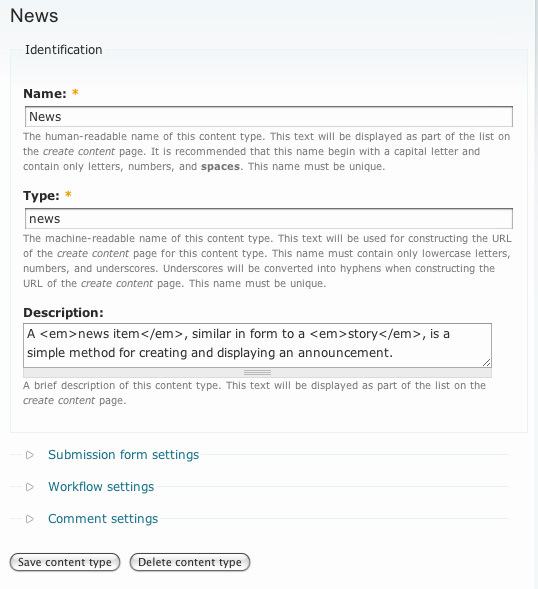
In the following example, the human-readable name for the content type is 'News', and the content type is displayed to the right of the 'submitted' info. Let's try and achieve that.

Your file node.tpl.php may look like this before the edit (I am only providing a snippet of the template here):
<?php if ($submitted): ?>
    <span class="submitted"><?php print $submitted; ?></span>
<?php endif; ?>
If it does, then you will change the above snippet to that:
<?php if ($submitted): ?>
<span class="submitted"><?php print $submitted; ?> — <span class="content-type-name"><?php print node_get_types('name', $node); ?></span></span>
<?php endif; ?>You may want to exclude a certain content type. For example, you may not want 'page' to appear in page nodes. Whenever you want to exclude one content type, you will do like so:
<?php if ($submitted): ?>
<span class="submitted"><?php print $submitted; ?><?php print ($node->type != 'page') ? ' — <span class="content-type-name">' . node_get_types('name', $node) . '</span>' : ''; ?></span>
<?php endif; ?>When you want to exclude more than one content type, say 'story' and 'page', you will do like so:
<?php if ($submitted): ?>
<span class="submitted"><?php print $submitted; ?><?php print (!in_array($node->type, array('story', 'page'))) ? ' — <span class="content-type-name">' . node_get_types('name', $node) . '</span>' : ''; ?></span>
<?php endif; ?>This will work in Drupal 5 as well. Again, this solution works only for PHPTemplate-powered themes.
You need to provide the machine-readable names for content types you wish to exclude, because $node->type is used in the condition, and it is the machine-readable name for the content type. Why are we comparing machine-readable names? Simply to avoid database queries. There is one database query we cannot avoid in our solution, it is the one query we execute to print the human-readable name for the content type.
Possible variations: place the content type information somewhere else in the node; display the content type information only in the teaser; etc.

Comments
Great
php code can sometimes be confusing This is well laid out thanks !!!! Wonderful information Please keep blogging!
Thank you for useful
Thank you for useful information. I'm starting to explore this area and your blog - one of my most favorite!
I would like to thank you
I would like to thank you for the efforts you have made in writing this post. I am hoping the same best work from you in the future as well. In fact your creative writing abilities has inspired me to start my own blog now.
Kaiser Insurance Rates
panic away by joe barry
panic away by joe barry reviews certainly like your website but you need to take a look at the spelling on quite a few of your posts. panic away by joe barry reviews A number of them are rife with spelling issues and I to find it very bothersome to tell the truth nevertheless I'll surely come again again. what is yeast infection no more
Various code you mention in
Various code you mention in this page is making me dizzy to apply. In my opinion, this is a pretty difficult thing to do because it requires precision and accuracy in combining these codes. site
To change the display name
To change the display name in the blog is not easy because a lot of code that must be applied properly in order to produce things like we want. Each letter has its own code, and if we make a mistake of course the expected results will not be achieved. Dan Lozano
Hi,Reading your posting I
Hi,Reading your posting I love it completely we appreciate you in your effort. I want to declare that it is very good and informative. Thanks.
gymnastics rings
I must speak to you by such
I must speak to you by such means as are within my reach. You pierce my soul. I am half agony, half hope. Tell me not that I am too late, that such precious feelings are gone for ever. I offer myself to you again with a heart even more your own than when you almost broke it, eight years and a half ago. Dare not say that man forgets sooner than woman, that his love has an earlier death.
cupping therapy
The steps that must be done
The steps that must be done to change the display name seems easy enough to do. In my opinion, this is one way that can be practiced by self-taught as a complete guide and we can discuss with the author if we find it difficult. Spiritual Books
A good example of content
A good example of content presentation. A piece of information from you every now and then is really great. Everything was so well coordinated and looked so aesthetically pleasing to the eye.
Zaman.be
Changing the look of the
Changing the look of the website is a thing that requires thought because of the changes made might be bad for a website that we have. Therefore, to study things that are favored by the users of internet is a pretty important thing to do. lakeway tx dentist
This is really good info. I
This is really good info. I can see lots of tips here explained in detail. I wish i landed here early. Anyways it's great to be here to get these updates.
Wonderful being going to
Wonderful being going to your blog once again, it's been weeks to me. This report in which i am silently laid for such a long time. I would like this information to complete my own project within the school, and possesses exact same topic using your..
Floodmasters
Thanks!
Thanks for this tip, it helped a lot. Personally I would add a hook_node() method to add this information to the $node object. And, better yet, I think the "readable name" of a node should be there by default (maybe in Drupal 8?) since the "type" is - but it seems counterintuitive to have to call a separate method just to get the readable name of a node's type.
Thank you for useful
Thank you for useful information. I'm starting to explore this area and your blog - one of my most favorite!
ta, node_get_types() was
ta, node_get_types() was what i needed!
Nice Post, Caroline. In
Nice Post, Caroline. In Drupal 7, however, I could not get this to work. Looks like there's been a change in the API.
So for those who may be interested, here's the code that worked for me with D7:
<?php print node_type_get_type ($node) -> name; ?>
Many thanks again !
UK dissertations
This blog is really very interesting and easy to understand the information provided in it. It is very nice to view this blog and it's nice to see the best information cited here.
Thank you.
amazing
This site is amazing. Appreciate these information.
excellent
I've read some excellent stuff here. Great site. A lot of useful information here.
The information you include
The information you include on this page I have tried and I succeeded in applying it. I think the way that you share on this page is easy to understand and do.
The way you refer in these
The way you refer in these pages is quite difficult to understand. I am actually quite interested in this program but I find it difficult to apply. Is there a more concise and easier to apply the program?
Okay, I've tried to do what
Okay, I've tried to do what you say on this page. In my opinion, it is quite easy to do, the codes used were already quite familiar to me. But I am a bit confused to develop this application to redesign my blog.
Surely suitable weblog
That's unerringly and surely a suitable weblog for anyone who needs to research for a particular purpose. You notice so broadly its essentially laborious to argue with you.
Himachal Honeymoon Packages | Himachal Honeymoon Tour Packages
well written
Some genuinely interesting information, well written. Glad to be one of the visitors of your site.
This is a great and
This is a great and inspiring article. You published very helpful information.
Randeep Grewal
I do not quite understand the technology and software on the computer. I think it is quite difficult to understand. Maybe you can give a more detailed explanation of the codes should be used.
vingino bikini
Whether by changing the format of a file will affect the contents of that file? In my opinion, change the format as you suggest is not too important to do.
A name will indeed be a very
A name will indeed be a very significant impact for many people and that makes a lot of people are concerned about the person's name.
To edit a blog for the
To edit a blog for the better in the function and design is quite difficult for me to do. This is because I do not really know how to program and also the creation of a blog.
Okay, I've tried to change
Okay, I've tried to change my name, but why is it coming out my email address? This is quite confusing to me, maybe you can give some explanation on this matter. personal health insurance california
This article is really
This article is really useful and have been looking for some information on this topic. Great job and waiting for your next update.
There are many people who
There are many people who use a unique name to make a lot of people interested in what is behind the name. You can indeed use a lot of unique things. 服飾批發
There are many people who
There are many people who apparently prefer to use a lot of unique names on the grounds that no one could equal it. While you will be able to find many ways to find many unique name. glock magazines
There are many things to
There are many things to many choose a unique name in an existing field. We were able to select multiple names that are unique to attract many people to see the product or our site. Hackett pas cher
It would be easier if I use
It would be easier if I use html format rather than the code like this. In my opinion, the format is easier to do and understand, the results can also be more precise and accurate. injector
Try what you say on this
Try what you say on this page seems quite interesting to do. In my opinion, this is one way in order to develop a blog that we have a way to make an attractive design. lift chairs
I do not quite understand
I do not quite understand the codes you mentioned on this page. In my opinion, it is quite difficult to understand. I've tried to apply these codes but I always fail to apply it. high bay lighting
I do not quite know how to
I do not quite know how to edit the appearance of plants and other writings. In my opinion, if I have to apply the code is quite complicated to edit the display, it looks like I can not do it. apotik online
favourite
I've really enjoyed reading your articles. You obviously know what you are talking about! Your site is so easy to navigate too, I've bookmarked it in my favourite.
It's good we do use many
It's good we do use many ways to be able to see that they are healthy to use many ways to stay healthy. One is by eating nutritious foods and exercise.
There are many things can
There are many things can affect a person in choosing a name that exists. The selection of the names have to be one of the hardest thing to do because it involves many aspects. unlock blackberry
Display text and design on
Display text and design on the blog are things that can be updated at any time. In my opinion, that view could be of interest to visitors if the design is appealing to the eye.
Appearance of a blog affect
Appearance of a blog affect the development of the blog itself. With the view that good and interesting course could attract visitors to visit the blog.
Anything that involves the
Anything that involves the design of a blog is something quite important to think and do. In my opinion, this could be one thing that can attract visitors to linger at home on your own blog. Montana health insurance plans
Many of the codes are quite
Many of the codes are quite complicated to apply this application. But I think it is not an obstacle for me to be able to apply this application, because the application is pretty much needed in the blog that I have.
There are many people who
There are many people who can display the name of the goodnessand will make a lot of people are interested to browse the content. You should find lots of unique ideas that can inspire. chin bar
To create a text to make it
To create a text to make it look appealing to visitors is not easy. But I will try your variation explained in these pages, though not easy to understand the codes, but I sure can do it.
great idea
I want to say that I don't think I've read anything so true in a long time. You've got a lot of great ideas, a great deal of perspective.
Suggestions you have to say
Suggestions you have to say on this page seems pretty easy to try. I was intending to do an update on the blog that I have, and change the look of the writing on the blog is one thing I can do. www.atlantaworkerscompensation.com
Changing the type of writing
Changing the type of writing on the blog is a way to update the look of the blog. According to me, the way you described on this page I can make a guide for changing the existing design on the blog that I have. used car lots dixie hwy
There's some code that I do
There's some code that I do not understand it well means that I am somewhat difficult to apply this application. Maybe you could give some alternative options to modify existing designs on the blog. bali yoga surf retreat
Node
This did the trick for me - thanks a ton!
Design on a blog is quite
Design on a blog is quite important to think for a change. I think the design is affecting the number of visitors who will be visiting the blog. Changing the design of your blog posts as well as the existing models is quite a good thing to do.
I am quite interested to use
I am quite interested to use this application. From the information I've heard, this application can be very helpful blog to be able to work with more leverage. infused olive oils
Been a long time I never
Been a long time I never switch anything on the blog that I have. To be honest I was a little confused to choose a theme and design to suit the character of the blog that I have. Hublot
It never hurts to try to
It never hurts to try to change the appearance of the blog design that I have. I think by doing so, I could be better in developing a blog that I have. In addition, the switch design blog, of course, can bring a fresh new atmosphere and not boring. BBQ Rental
Die Informationen, die Sie
Die Informationen, die Sie zählen auf dieser Seite habe ich versucht, und es gelang mir es anwenden. Ich denke, die Art und Weise, dass Sie Aktien auf dieser Seite ist einfach zu verstehen und zu tun.
Thanks
I just started with PHP and this help me a lot
Many Thanx
Great info I was searching for how to do this
This is useful information
This is useful information that should be more widely known. Thanks for making me aware of it.
An item that has a name that
An item that has a name that is not interesting indeed be missed by many people. Everyone was like content that has a lot of interesting things in it. Joyetech eCab
An item that has a good name
An item that has a good name is commonly found today. You are able to find out about a lot of interesting content that you can use today. painters in sacramento
The information provided on
The information provided on your site is well researched, this kind of information is not available so easily. Thanks for sharing.
Great..
Thanks for sharing such a nice topic about displaying or showing the content type name... I really appreciate your effort and work that you have done for us.
Sir Stamford at Circular Quay Hotel...
Well Written
Twin Fountains EC is a 99-years leasehold Woodlands EC development located at Woodlands Drive 16 in District 25. With expected completion in mid 2016, it comprises of 8 towers with 418 units and stands 14 storeys tall.
Twin Fountains
This internet web site is
This internet web site is often a walk-through rather than the details you wanted about it and didn’t know who ought to. Glimpse here, and you’ll definitely discover it.
Professionele schoonmaak
You need to provide the
You need to provide the machine-readable e-papierosy names for content types you wish to exclude, because $node->type is used in the condition, and it is the machine-readable name for the content type. Why e-papierosy are we comparing machine-readable names? Simply to avoid database queries. There is one database query we cannot avoid in our solution, it is the one query we execute to print the human-readable name for the content type.
Several buses are available
Several buses are available near Coral Edge Residences along with shopping centers and restaurants. Coral Edge Residences is also near Waterway Point, the shopping, dining and entertainment hub which is scheduled to open in 2 years time. Also, it is right beside Punggol Waterfront. Entertainment for your loved ones and friends are therefore at your fingertips with the full condo facilities as well as the amenities near Coral Edge Residences .
A luxurious lifestyle awaits you
Coral Edge
It is a short drive away
It is a short drive away from Woodlands and Admiralty MRT Station. Future residents will be able to walk to the nearby Vista Point or a short drive to Causeway Point for some family fun and gatherings. A truly unique lifestyle awaits you.
Woodlands EC