
Syndicate


| Title | Hits |
|---|---|
| Theming the register form in Drupal 6 | 632281 |
| True or false in php | 409690 |
| Theming the contact form in Drupal 6 | 248236 |
| File download in Drupal | 212214 |
 The book jQuery in Action is no light reading. It's not the type of book you can read in a couple of sittings. I started reading my copy several months ago. It might easily become one of the best three-to-five computer books I'll read in my life. I am reading the excellent appendix now, titled:
 JavaScript that you need to know but might not!
Boy did I totally not! I will dump what I am learning here in two installments.
In JavaScript, everything is a property of an object — or else it is disembodied, floating in deep Space, unreferenced. Or I should say: Everything is assigned to a property of some object.
Let’s begin by examining sample code. I would like to create a new object in JavaScript. I go about doing it in the following fashion:
/* Using the new operator with the Object constructor. */
var car = new Object();
/* Populating the empty object with properties. */
car.make = 'Nissan';
car.model = 'Altima';
car.year = 1992;
car.purchased = new Date(1998, 8, 21);
In client-side web JavaScript, an object is an unordered collection of properties. In client-side web JavaScript, an object has no methods. A property has a name and it has a value, and the value is always an object. It can be an Object object, it can be a String object, a Number object... or it can be a Function object.
I am already using object literals to define my car object. I could be anal and redefine my object by being a lot more verbose in the following fashion:
var car = new Object();
car.make = new String('Nissan');
car.model = new String('Altima');
car.year = new Number(1992);
car.purchased = new Date(1998, 8, 21);
We can easily nest an Object object within an Object object like so:
var car = new Object();
car.make = new String('Nissan');
car.model = new String('Altima');
car.year = new Number(1992);
car.purchased = new Date(1998, 8, 21);
var owner = new Object();
owner.name = new String('Caroline Schnapp');
owner.occupation = new String('occupational hazardist');
// The car owner is an Object object.
car.owner = owner;
Then we can refer to the car owner's name like so:
var myName = car.owner.name;
So a JavaScript object is an unordered collection of properties, or named values. It is much like a hash in Ruby.
We can use what's called object literals to define our object in a less verbose fashion. The following code snippet will define the exact same car object but this time using object literals all the way — except for the Date object, that is:
var car = {
  make: 'Nissan',
  model: 'Altima',
  year: 1992,
  purchased: new Date(1998, 8, 21),
  owner: {
    name: 'Caroline Schnapp',
    occupation: 'occupational hazardist'
  }
};
Using the dot notation is only one way to access the value of a property, one that's recognized by programmers who have come to OO-programming from other languages like C++ — programmers like myself, in other words. There is a more general way of accessing a value that will work for any sort of property name. It would work for a property name that contains a space, a dot, or even for a property name that is computed! So here's the dot notation and the more general way of reading a property value:
Hence, the following console.log() statements will output to your Firebug console the same property value:
console.log(car.owner.name);
console.log(car['owner']['name']);
console.log(car['ow'+'ner'].name);
var n = 'name';
console.log(car['owner'][n]);
The following two statements are perfectly equivalent:
/* Ubiquitous way of declaring a function */
function outputText(text) {
  console.log(text);
}
/* What this hides is that I just assigned a Function instance
 * to the window 'outputText' property...
 */
window.outputText = new Function('text', 'console.log(text);');
So a function is really a Function object, or Function instance.
It doesn't have a name. Does not. It has a list of arguments (could be zero, one or more arguments), and it has a body, that is, some code to execute.
Really, 'outputText' is not the name of any function; 'outputText' is a property of the window object, to which we are assigning a Function instance.
Yes, we defined a global-scope function, so it got assigned to a property of the predefined window object. Top-level variables are properties of the window object, as well. Remember: Everything is a property of an object in JavaScript.
After such declaration, we can use the outputText() function like so:
outputText('hello');
/* Or, same thing: */
window.outputText('hello');
We can assign that function object to a new property like so:
var create = outputText;
/* Or, same thing: */
window.create = outputText;
/* Or, same thing: */
window.create = window.outputText;
To reuse the function object like so:
window.create('hi');
/* Or, same thing: */
create('hi');
We defined a Function instance and assigned it to a top-level window property. But we can also assign Function instances to properties of run-of-the-mill Object objects. Let's extend our car object with a utility function that provides the name of its owner:
var car = {
  make: 'Nissan',
  model: 'Altima',
  year: 1992,
  purchased: new Date(1998, 8, 21),
  owner: {
    name: 'Caroline Schnapp',
    occupation: 'occupational hazardist'
  },
  whoOwnsMe: function() { return this.owner.name; }
};
That was sneaky of me, I just introduced you to a concise way of defining a Function instance called a Function literal. Number objects have their object literal shorthand definition. String objects have their object literal shorthand definition. And so do Function objects! The following four statements are perfectly equivalent:
/* Ubiquitous way of declaring a function */
function outputText(text) {
  console.log(text);
}
/* What this hides is that I just assigned a Function instance
 * to the window 'outputText' property...
 */
window.outputText = new Function('text', 'console.log(text);');
/* And now, ladies and gentlement,
 * the shorthand version.
 */
window.outputText = function(text) {console.log(text)};
/* or, same thing... */
outputText = function(text) {console.log(text)};
So it looks like all object types in JavaScript (Object, Function, Number, String, to name a few) have their own object literal way of being defined.
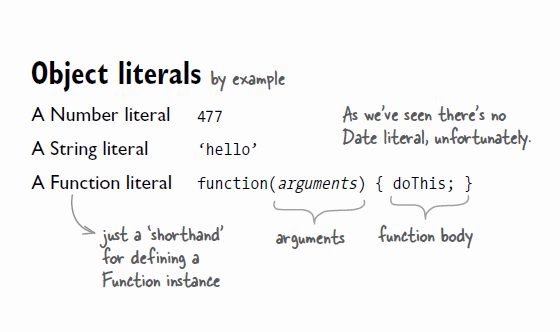
I can use my utility Function this way:
var myName = car.whoOwnsMe();
/* which is nothing else than... */
window.myName = car.whoOwnsMe();
Function instances can be assigned to properties — and they can also be used as parameters. Assigned they can be, but they have no name. They only have arguments and a body, that's it and all. The following drawing shows the divide that exists between the Object that references a Function instance, and the Function instance that's referenced. The function acts as a method of the Object, yes, you could say that, but it really is not a method, because it does not belong to the Object per say. It lives outside of it.
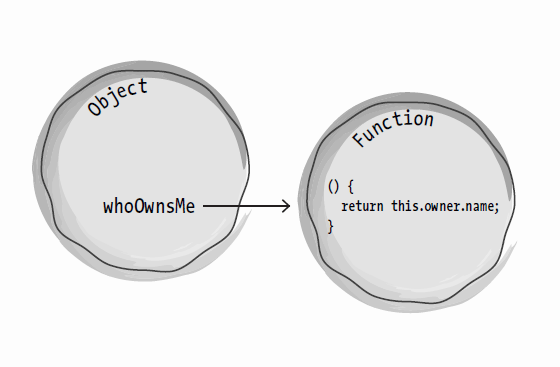
You want proof that our no-name Function instance does not belong to our car object? Let's assign a String instance to car.whoOwnsMe right now.
car.whoOwnsMe = 'The god of cars';
The car.whoOwnsMe property used to point to a Function instance...? Not anymore. We can reassign to the car.whoOwnsMe property whatever value our whims dictate, such as: another Function instance, a String instance, a Number instance, whatevah and whenever.
What happens when we use car.whoOwnsMe as if it was still pointing to a function? We get this error in our Firebug console: TypeError: car.whoOwnsMe is not a function
. Try it out:
/* Making my property 'reference' a String object. */
car.whoOwnsMe = 'The god of cars';
/* Using the property as IF it was still referencing a function. */
var myName = car.whoOwnsMe();
/* You should get a JavaScript error with the last statement.
/* And now using the property as we should... */
var hisName = car.whoOwnsMe;
/* hisName is now equal to 'The god of cars'. */
/* The End */

But it is just some Function instance temporarily or permanently assigned to a named property of some object. It is a property among many. It is not really a method. It can act as if but it is not.
It's all an act. Do not be fooled.
So let's recap: an Object object is an unordered collection of named properties. To these properties are assigned values. These values are object instances of different types. These types can be: Object, Function, String, Number. In the life span of an object, we can re-assign new values to the object's properties — although common sense would suggest that we avoid this.
A Function instance is a stand-alone ranger of JavaScript space. Many different properties can point to him/her. What I mean here is that we can assign to many different properties belonging to many different objects a same Function instance. That's called code reuse. And within the body of that Function instance, that's been assigned to all who want it, the keyword this will point to the current object the Function is assigned to.

Comments
Awesome article
This is super-important stuff to be aware of with Javascript.
Jquery
jquery is the great free javascript library !
Nice one
Must read for a web dev.Nice article.keep going.all the best
In client-side web
In client-side web JavaScript, an object is an unordered collection of properties. In client-side web JavaScript, an object has no methods. A property http://e-papierossy.com.pl/en/e-papierosy/118-e-papierosy-zerok-za54113.html has a name and it has a http://e-papierossy.com.pl/en/e-papierosy/120-e-papierosy-gambit-77890.html
value, and the value is always an object. It can http://e-papierossy.com.pl/en/e-papierosy/70-e-papierosy-gombit-54246.html be an Object object, it can be a String object, a Number object... or it can be a Function object.
I am already using object literals to define my car object. I could be anal and redefine my object by being a lot more verbose in the following fashion:
Interesting
Thanks for this interesting article. It helped me to better understand the appendix of "JQuery in Action", even though I think I should go over both again a few more times... :)
I'm glad you found this article interesting
Thank you for taking the time to post your positive feedback!
Caroline
Looking forward to the 2nd Ed. of this book
Oh - you gave this post the bump :)
Just wanted to say that 'jQuery in Action' 2nd Edition is out in a few months (around about April I believe) and will cover jQuery 1.4 - jQuery 1.4 is due a final release on the 14th of January.
You have a gift!
I suspect the contents of this post are not a direct copy from the book but rather your rendering of the concepts? If so, you have a gift. The way you express yourself and provide access to concepts with clear explanations and examples is a rare talent.
Thanks for posting, you've made my day a little easier which I'm sure will care forward into the weeks to come.
PS - I'm in the middle of writing my first module, you've cleared up a few crossed wires for me.
Yes, this is my own take..
Yes, this is my own take, that is, my own wording, organization and sample code.
That's how I learn: rephrase, expand, try out stuff. That's how most people learn.
Thank you for the great compliments! :)
Have a good week-end...
Caroline
Method Belongs to Object !!!
In OOPs we never say that method belongs to an oject, we always say that method belongs to a class and the concept of this pointer n code reuse is true anywaz
The article is really great n helpful in many ways. Thanks for sharing :)
Please explain something
In your article:
I quote, "In the life span of an object, we can re-assign new values to the object's properties — although common sense would suggest that we avoid this."
You never explained the reason why we should avoid this.
There are countless of reasons to change the value of a property. This happens all the time in a web browser. If I make an object and give it properties/values, I can update the value of any property I want, anytime. Who are you to say that this is against common sense when everyone that uses JavaScript does this all the time? Just a question, not a rant really. I was curious to what you meant by saying that.
re: assign new values
Perhaps what you meant to say was, "there are countless reasons
to change a property object's value". Changing the property value
means changing the object associated with the property, which I
think is rarely required in a good design. If you do this a lot, no one,
including yourself, will want to maintain your code. But if I misunderstood
your comment, let me know.
Good article
Well explained, was looking for this kind of info on javascript functions for quite some time. This article supported my suspicions :) Anyways, good writing.
article
How do I see if a certain object has been loaded, and if not, how can it ... If it is an object then you should just be able to check to see if it is null
I'm bookmarking this, this
I'm bookmarking this, this is good stuff. Don't you ever dare take this page down....
:)
There are plenty of errors
There are plenty of errors in this article. I have to wake up in 5 hours, so please forgive me if I sound harsh.
First, strings and numbers (and booleans) are NOT objects in javaScript. They are primitive types. They are inmutable. They have no properties. You can not dynamically add a property to a string or number, as you could if they were objects.
Ok, you are using string methods and properties (length, for example) every day, so.. what the heck? Solution: In javaScript there is a thing called Wrapper Objets. For example, the String, Number and Boolean classes. Every time you call to a method or get a property of a string, a new String wrapper object is created, used, and then discarded. This happens without you noticing. So at the you can think that strings, numbers and boolean act almost like objects, but only with read-only properties and methods. (Note that, for example, arrays are actually objects, and they have methods which do change the array itself, while all the strings methods are non-destructive).
But still they are not objects:
The previous method generates these logs:
typeof s1: string
typeof s2: object
they are equal by ==
they are not equal by ===
Hence var s = 'abc' is NOT the same as var s = New String('abc') . The latter is explicity creating a wrapper object. That is very rarely desired, and in fact, as shown above, could broke your type checks and comparisons. And, by all means, var s = 'abc' is NOT an object Literal!
As a recomendation: check out "JavaScript: The Definitive Guide" by David Flanagan.
Sorry for the broken English (it's so late!), and for being so critic.
Thank you.
Even with Ismael's corrections, what you wrote really helped me to understand this better. Have bookmarked your page. First learned js about 12 years ago, so this is a refresher for me.
Object itself is a function
In Javascript everything is a function. Object itself is a function (try for example alert(Object)). If you want to create new types of objects, you do it with a function. JQuery takes advantages of the javascript's dynamic capabilities to add functional programming practices. You can use OOP with Javascript, just like you can use functional programming, because the language is flexible. But in the end, everything is a function (except 4 primitives types), so your article is wrong from the title.
Rare and Excellent Post
Several buses are available near Twin Fountains EC along with shopping centers and restaurants. Twin Fountains EC is also near Causeway Point as well as Woodlands Waterfront. Entertainment for your loved ones and friends are therefore at your fingertips with the full condo facilities as well as the amenities near Twin Fountains EC.
Woodlands EC
hat I precisely want to do
hat I precisely want to do is, I select something from a drop down list and based on that selection something changes in my page. The change could be an execution of a query or something else. I know JSF has action handler to do this. But I'm very new to PHP and I have no idea how to do that in PHP. Any help will be appreciated. Thank you. spilleautomater gratis på nett
yeah well thats right in
yeah well thats right in java script everything ids always in property-of-an-object, infect you can say every thing ids revolved around the object ,well its nice i really like the as you have just told us with example.
Plymouth Locksmith
Great post!
This looks absolutely perfect, Really its remarkable. You have some great content but are getting lots of none relevant comments here too. I really like in a site, very informative, no waste of time on reading.
excellent post
Great blog. hope to read more from author. Hedges Park Condo, Topiary EC, Twin Fountains Woodlands
Yes, we defined a
Yes, we defined a global-scope function, so it got assigned to a property of the predefined window object. Top-level variables are properties of the window object, as well. Remember: Everything is a property of an object in JavaScript. http://e-papierosy.weebly.com/
e-papierosy
Future residents will be
Future residents will be able to walk to Jurong East MRT Station which is located right beside it. Also, nature awaits your family and friends at the Jurong Lake Park and the Jurong Country Park. Also, the ultimate nature awaits you the Japanese Garden.
J Gateway
java script
We always trying to write a beeter algo so that result will came & it influenced the other one. how2seobacklinks.com
Coral Edge Residences has
Coral Edge Residences has full and unique facilities, which includes a guard house, clubhouse, Function Room & Indoor Gym Tennis Court, 50m Freeform Pool Pool Deck, Wading Pool, Splash Pool & Family Pool Jacuzzi & Hydro Spa, BBQ Area Dining and Play Fountain, Fitness Alcove & Children’s Playground and Garden Trail. The condo’s facilities provide full family entertainment needs for your family and loved ones. Indulge in a serene and tranquil lifestyle right in the heart of Punggol.
Thx
Coral Edge
Awesome Article. Thank You
Buangkok Condo A very awesome blog post. We are really grateful for your blog post. You will find a lot of approaches after visiting your post. I was exactly searching for. Thanks for such post and please keep it up. Great work. ... Jewel At Buangkok | Jewel @ Buangkok | Corals at Keppel Bay
J Gateway Condo has full
J Gateway Condo has full and unique facilities
A very wonderful blog post. Great revision for Java Script. I was exactly searching for this. Thanks for such post and please keep it up. Great work.
J Gateway Condo
Thanks for your article. It
Thanks for your article. It helps me better to understand the real definition of Function instance.
Corals At Keppel Bay
D'pristine
It would work for a property
It would work for a property name that contains a space, a dot, or even for a property name that is computed! http://www.braungresham.com/2013/05/thomas-hall-to-speak-on-estate-planning-at-old-blanco-county-courthouse-61313/
well i think you are right.
well well well, i think this post is absolutely brilliant and it helps me to understand more. lush acres 5 bedroom floor plan
I really appreciate the
I really appreciate the topics you post here in your article. Please keep on writing as I want to learn more from you. Thanks!!!
tanjong pagar centre
tp180
This review is very thorough
This review is very thorough and informative for a screencast that is teaching thousands improper methods and rules. http://www.boats-for-sale-worldwide.com/315/Fishing-Boats.html
They are inmutable. They
They are inmutable. They have no properties. You can not dynamically add a property to a string or number, as you could if they were objects. http://www.concessionaria-hyundai.com.br/hb20/
comnet
It would work for a property name that contains a space, a dot, or even for a property name that is computed!
camerathanhxuan.com jusst need chepphim3d.net and thietbivesinh360.com you need trangraovat.org
Your article gives me much
Your article gives me much more useful information. Thanks for your help. Some other readers may find this useful too. The increase of Canada goose jackets different designs and styles of Monocle personalized items is unstoppable. From very small and simple items to huge and elegant ones are can be engraved, embroidered and monogrammed.
The post should have
The post should have magnificent guidance on this important matter. I am always searching online for this article, looking forward to another great post.
This is particularly
This is particularly unfortunate for New Orleans, given Republican Gov. Bobby Jindal's commitment to pre-release job-training programs in local and parish jails. http://scamoftheday.com
hank you for posting this! I
hank you for posting this! I am wondering why they made the program so hard to use if it requires that much work? http://www.pier420.com
The Inflora Condo has full
The Inflora Condo has full and unique facilities, which includes a guard house, clubhouse, children’s playground, swimming pool, kid’s pool, function room, dining pavilion, playground, poolside BBQ, waterjet pool. The Inflora
The blog is really nice and
The blog is really nice and interesting.I like the blog post to read.Thanks for the blog. http://www.nrl500.com.au/
I started reading my copy
I started reading my copy several months ago. It might easily become one of the best three-to-five computer books I'll read in my life. http://www.malaysiafatburner.com
The Hillford Condo Jalan Jurong Kechil
The Hillford Condo is a new and upcoming condominium located in the Bukit Timah Jalan Jurong Kechil area, within a short drive to Beauty World and King Albert's Park and Ten Mile Junction. With expected completion in mid 2016, it comprises of TBA towers with TBA units and stands TBA storeys tall. The Hillford Condo Jalan Jurong Kechil new launch property
Also, nature awaits your
Also, nature awaits your family and friends at the Jurong Lake Park and the Jurong Country Park. Also, the ultimate nature awaits you the Japanese Garden.
correction
You said:
--------------------------------------------------------
The following two statements are perfectly equivalent:
function outputText(text) { console.log(text); }
window.outputText = new Function('text', 'console.log(text);');
--------------------------------------------------------
This is not true. The following two snippets of code are treated differently.
1. outputText('foo'); function outputText(text) { console.log(text); };
2. outputText('foo'); window.outputText = new Function('text', 'console.log(text);');
thanks for this
I truly appreciated this post, many thanks for putting up it. vigrx plus xp moon
chao !
great ! this blog is great !